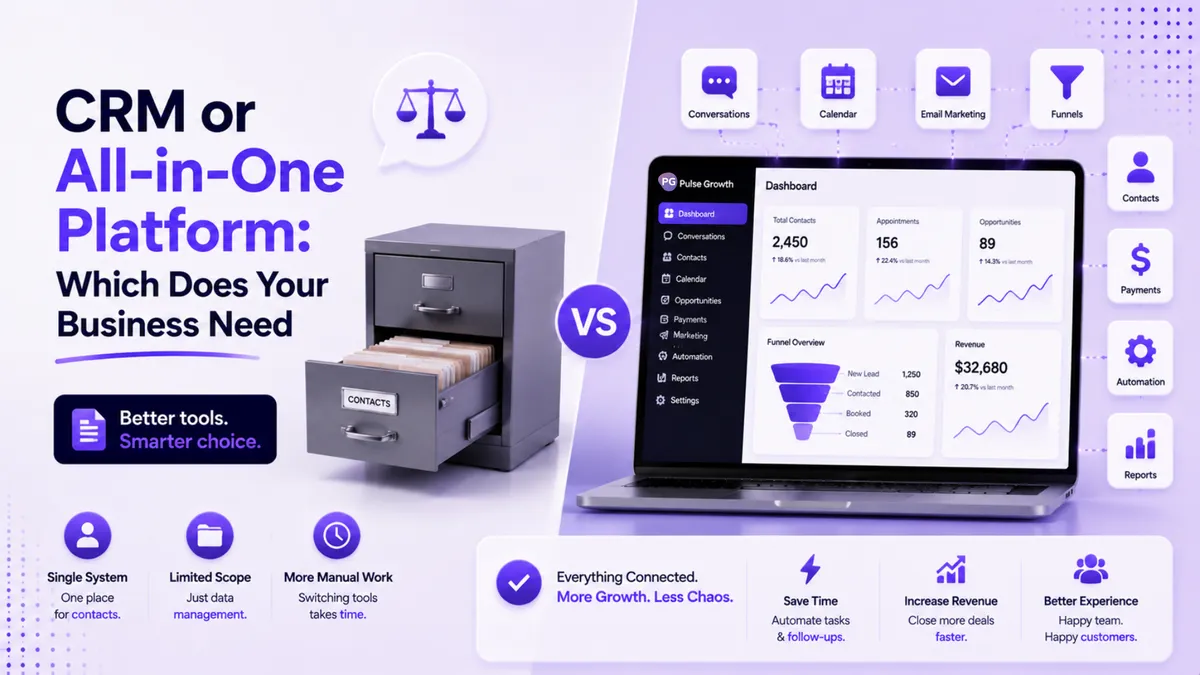
CRM vs. All-in-One Platform: Which One Does Your Business Actually Need?
Somewhere between your third software subscription and your seventh, a question starts nagging: do I actually need all of this? Maybe you just need a proper CRM. Or maybe you need one platform that does everything. The two get talked about as if they're the same thing, and they really aren't.
Quick Answer: CRM vs All-in-One Platform, What's the Difference?
A CRM stores your contacts and tracks your deals, and that's its whole job. An all-in-one platform does that too, and also sends your emails and texts, hosts your booking calendar, runs your automations, hosts your website, and can include an AI agent and invoicing. Choose a plain CRM when your existing tools already work well together. Choose an all-in-one platform when you're paying for several disconnected tools and copying information between them by hand.
What Does a CRM Actually Do?
CRM stands for customer relationship management, and a classic CRM does exactly what it says: it's the organized memory of your business. Every contact, every conversation logged against them, every deal and where it stands. Done well, it means nobody on your team ever asks "wait, who is this person?" again.
What a plain CRM doesn't do is the surrounding work. It won't send your email campaigns, host the calendar people book you through, chase the lead who went quiet, or build your landing page. It expects you to have other tools for all of that, and it expects those tools to play nicely with it.
Sometimes they do. And if yours do, a CRM may be all you're missing.
What Does an All-in-One Platform Include?
An all-in-one platform starts with the CRM and keeps going. Email campaigns, text messaging, the booking calendar, the automations that follow up with leads, your website and landing pages, and increasingly the AI pieces too, like an AI agent that answers inquiries. PulseGrowth, our all-in-one CRM and automation platform for service businesses, also covers invoicing and payments, so the whole client journey from first inquiry to paid invoice lives in one login.
The pitch isn't "more features." It's fewer places for things to fall apart. When the form, the CRM, the follow-up, and the calendar are all one system, a new lead flows from filled-out form to booked call without any tool having to successfully hand off to another.
How Do You Decide Which One You Need?
Here's the honest framework, and notice that it doesn't start with price.
Keep it simple and get a plain CRM if your current tools already talk to each other properly. You like your email platform, your booking tool works, and leads move between them without anyone retyping anything. In that case, adding a CRM fills the one gap you actually have. Ripping everything out would be change for its own sake.
Go all-in-one if you're paying for five or six separate things that don't talk to each other, and you (or someone you pay) copy information between them by hand. That's not a software stack, that's a bucket brigade. Consolidating saves money on subscriptions, but the bigger win is time and the end of copy-paste admin.
This decision comes up for every service business at some point: coaches, consultants, med spas, clinics, home service companies, agencies. The tipping point is rarely the cost of the tools. It's the workload of keeping them connected.
What's the Real Cost of Disconnected Tools?
The real cost of separate tools isn't the subscriptions. It's the gaps between them.
The gaps are where leads go missing. Someone fills out the form on your website, and the submission sits inside your website platform instead of reaching your CRM. Nobody follows up, because as far as your CRM knows, that person doesn't exist. You never find out. From the outside, your business just went quiet on someone who raised their hand.
You can't see this leak on any invoice, which is why it survives for years. One place to look means fewer places for things to fall through.
If you're weighing the subscription math side of this, our pricing page shows what consolidating actually costs, and there's a full breakdown of the hidden costs of juggling multiple tools on the PulseGrowth blog.
Key Takeaways
- A CRM stores contacts and tracks deals, while an all-in-one platform adds email, texting, booking, automation, websites, and more on top.
- Stick with a plain CRM when your existing tools already integrate cleanly and nothing is being retyped by hand.
- Move to an all-in-one platform when you pay for several disconnected tools and copy information between them manually.
- Count the gaps, not just the subscriptions, because disconnected tools lose leads silently.
- Test any leak by filling out your own website form and checking whether it reaches your CRM and triggers a follow-up.
FAQs
Is a CRM the same as an all-in-one platform?
No. A CRM manages contacts and deals, and that's it. An all-in-one platform includes a CRM plus email, texting, booking calendars, automation, website hosting, and often AI and invoicing. Every all-in-one contains a CRM, but a CRM is not an all-in-one.
When is a plain CRM enough for a small business?
When your other tools already work well together. If your email, booking, and website pass information between themselves without manual copying, a plain CRM fills the gap without forcing you to rebuild everything.
When should I switch to an all-in-one platform?
When you're paying for several tools that don't talk to each other and someone is moving data between them by hand. At that point the all-in-one usually saves money, saves time, and stops leads slipping through the cracks between systems.
Do disconnected tools really lose leads?
Yes, and quietly. A common example: a website form submission that stays in the website platform and never reaches the CRM, so nobody follows up. The lead was real, the interest was real, and nothing happened.
Is an all-in-one platform harder to learn than a CRM?
There's more inside it, so there's more to learn eventually. But you don't have to learn it alone. With PulseGrowth, we set the platform up with you and train your team, so you start with working systems rather than a blank dashboard.
Want More Like This?
Start a free 14 day trial of PulseGrowth and get the CRM, booking, automations, and website tools in one place. Start free, and we'll help you get it set up.
The PulseGrowth Team