Just Switched CRMs? Your First Week Setup Checklist
Moving your data was supposed to be the hard part. It isn't. The migration gets all the attention, but the first week inside a new CRM is what decides whether your team actually uses it or quietly drifts back to the old spreadsheet. We've onboarded a lot of businesses onto a new platform, and the ones who win their first week all do roughly the same four things, in roughly the same order.
This is the new CRM setup checklist we walk through with them. If you just migrated (or you're about to), work through it before you touch anything else. And if you haven't made the move yet, start with our guide on how to switch CRMs without losing anything, then come back here for week one.
Quick Answer: What Should You Set Up First in a New CRM?
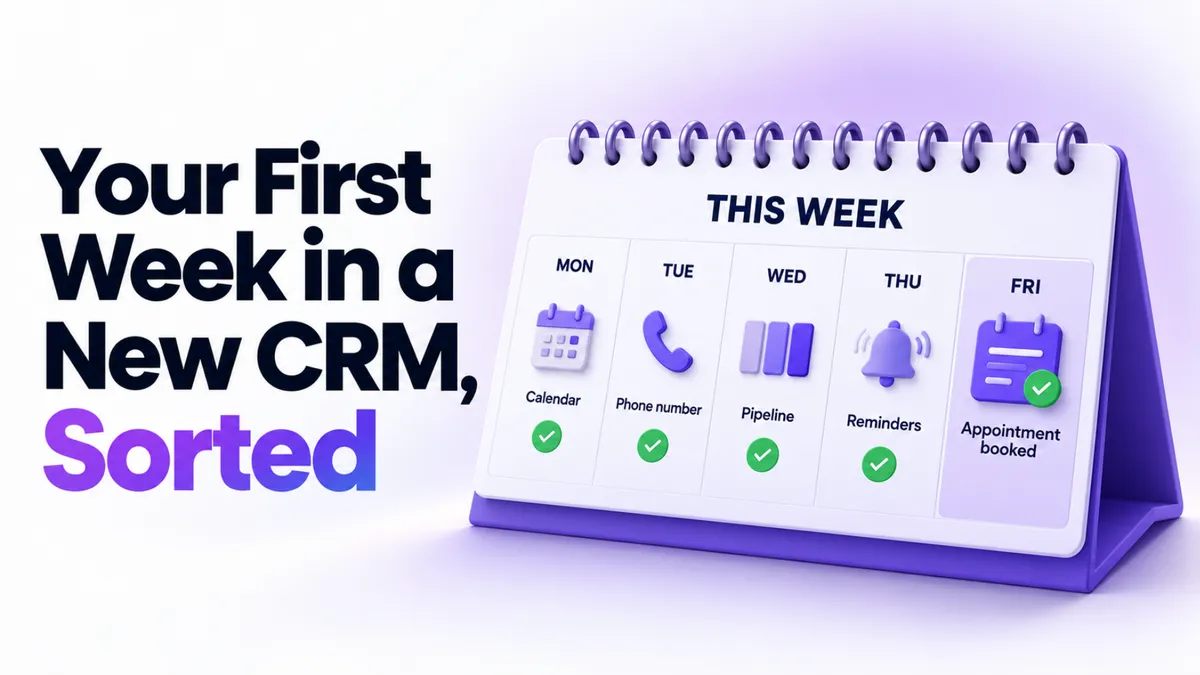
In your first week with a new CRM, set things up in this order: connect your calendar, start your phone number and A2P registration, build one simple sales pipeline, then switch on appointment confirmations and reminders. This order works because the slowest approval (A2P) runs in the background while you set up the quick wins. By the end of the week, leads can book with you, you can text them legally, and nobody forgets an appointment.
Why Does the First Week Matter So Much?
Because habits beat software. Every time someone on your team can't find a contact or doesn't know where to log a call, they fall back on whatever they used before. Do that for two weeks and the new CRM becomes the expensive thing nobody opens.
The fix isn't learning every feature. It's getting a small number of visible wins live fast, so the new system becomes the obvious place to work. One booked appointment that confirmed itself will convert a skeptical team member faster than any training video.
This checklist is built for service businesses: coaches, consultants, clinics, med spas, home services, local businesses. If your week revolves around appointments and following up with leads, this order will fit you well. If you run e-commerce, your week one looks different.
Day 1: Connect Your Calendar First
Your calendar is the fastest win on the board, which is exactly why it goes first.
Connect your Google or Outlook calendar so the system can see when you're actually free. Then set up one booking calendar for your main appointment type: the discovery call, the consultation, the estimate visit. Not all five appointment types. One.
While you're in there, click through the other one-tap integrations: your payment processor, Zoom if you meet online, your social accounts if you post regularly. Most platforms (ours included) make these a connect button rather than a project.
Why first? Because a working booking link changes behavior immediately. You stop playing email ping-pong about times, and every booked call lands in the CRM as a contact automatically. That's the system quietly proving its worth on day one.
Day 2: Start Your Phone Number and A2P Registration
Here's the step most people discover too late. If you want to send text messages from your new system in the US (appointment reminders, review requests, quick replies), your business needs A2P registration. It's a carrier requirement, the approval takes days rather than minutes, and until it's done your texts can quietly fail to deliver.
So day two is simple: get your business phone number set up in the platform and submit the A2P registration, then let it process while you do everything else this week. The details on the form matter more than people expect. Your legal business name and EIN have to match exactly, and a mismatch is the most common reason registrations bounce. We wrote up the full story in why A2P verifications fail if you want to get it right the first time.
Nothing else in week one has a waiting period. This does. Start it early and it's approved by the time your reminders are ready to send.
Days 3 and 4: Build One Simple Pipeline
A pipeline is just the stages a lead moves through, laid out so you can see where everyone is. New lead. Contacted. Booked. Won. That's enough for week one.
The temptation is to recreate the elaborate system you had before, with nine stages and color codes. Resist it. A four-stage pipeline your team actually updates beats a nine-stage pipeline they avoid. You can add stages later, once real use shows you where the gaps are.
Spend day four moving your current open leads into it. Not your whole database. Just the people you're actively talking to right now. When your team opens the CRM on Friday and sees their real deals on the board, the system stops being theoretical.
If you'd rather not do any of this alone, that's what our setup help is for. When you start with PulseGrowth, our team connects your calendar, email, and A2P registration with you, free, as part of getting started. It's the part of setup people find most painful, so we just do it together.
Day 5: Switch On Confirmations and Reminders
This is your first real automation, and it's the one with the most visible payoff. When someone books, they get a confirmation. The day before, they get a reminder. An hour before, one more. You set it up once and no-shows start dropping that week.
It's also the perfect first automation because it's low risk. A reminder can't embarrass you the way a half-finished nurture sequence can. We've got the exact click path in our step-by-step guide to setting up appointment reminders.
One note: your text reminders will only go out once that A2P registration from day two is approved. Email reminders work right away, so turn both on and let the texts join in when approval lands.
What About Everything Else From Your Old System?
Leave it. Seriously.
Your old CRM probably had years of automations, tags, and workflows layered into it. Rebuilding all of that in week one is how people burn out on a new platform before it ever pays off. Keep the old system in read-only mode for a few weeks as a reference, rebuild automations one at a time as you actually need them, and let the rest retire quietly. Most businesses find a third of their old automations weren't doing anything anyway.
Key Takeaways
- Set up your new CRM in this order: calendar, phone number and A2P, one pipeline, confirmations and reminders.
- Start A2P registration on day two because it's the only step with a multi-day waiting period.
- Build a four-stage pipeline and load only your active leads, not your whole database.
- Turn on appointment confirmations and reminders as your first automation for a fast, visible win.
- Rebuild old automations one at a time as you need them instead of recreating everything in week one.
FAQs
How long does A2P registration take?
Usually a few days, sometimes longer if the carrier flags a detail. The most common delay is a mismatch between the legal business name and EIN on your registration. Submit it early in your first week so it's approved before you need to text anyone.
Do I have to finish all my setup in one week?
No. The point of the checklist is to get the four highest-payoff pieces live in week one. Everything else, like nurture sequences, review requests, and extra calendars, can roll out over the following weeks.
What if my team keeps using the old system?
Give them one reason per day to open the new one. Booked calls landing automatically, deals visible on a pipeline, and reminders sending themselves usually do the convincing within a week or two.
When can I switch off my old CRM?
Keep it in read-only mode until you've confirmed your contacts, active deals, and key automations are rebuilt and working, which for most businesses is two to four weeks. Canceling on day one of the new system is the most common migration regret we see.
What should I not automate in my first week?
Anything that talks to a lot of people at once, like bulk email campaigns to your whole list. Get your foundations and your sending reputation in order first.
Want More Like This?
The fastest way to get this whole checklist done is to not do it alone. Start a free 14 day trial of PulseGrowth and our team helps you set it up: calendar, business email, phone number and A2P registration, and your first automations. Start free, and we'll help you get it set up.
The PulseGrowth Team


