Types of Booking Calendars Explained: Which One Does Your Business Need?
Picking the wrong booking calendar is one of those mistakes you don't notice until it hurts. Appointments land on the wrong person, a class overbooks, or a client books you for a service you don't even offer on Tuesdays.
The good news: choosing the right one is simple once someone explains what each type is actually for. No tech background needed. Here's the plain guide.
Quick Answer: What are the types of booking calendars?
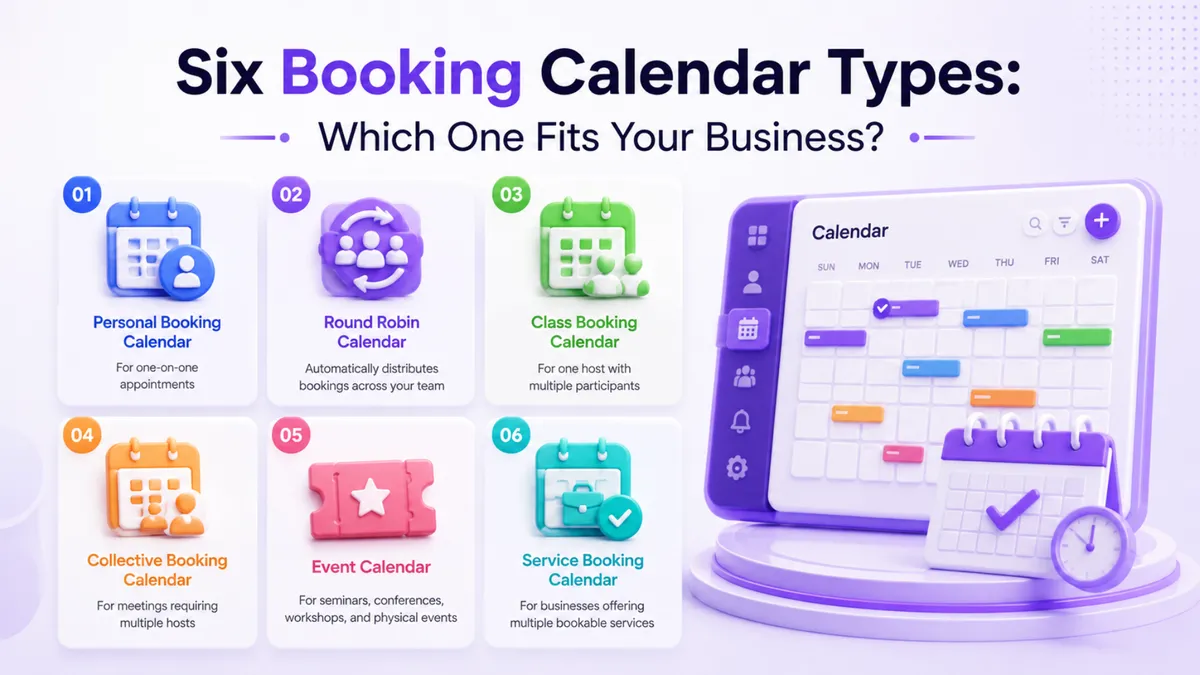
There are six types of booking calendars in PulseGrowth, an all-in-one CRM and automation platform for service businesses. A personal calendar books one person with one customer. A round robin calendar shares bookings across a team. A class calendar lets many people join one session. A collective calendar puts several team members into the same meeting. An event calendar handles physical events like seminars. A service calendar lets customers pick from a menu of services before choosing a time. To pick the right one, answer two questions: how many people from your side attend each appointment, and how many customers attend at once.
How do you know which calendar your business needs?
Here's the shortcut. Is it you meeting one customer at a time? Personal. A team where any member can take the booking? Round robin. One of you teaching a group? Class. Several of you meeting one customer together? Collective. A big in-person event? Event. Customers choosing from a list of treatments or services? Service.
Now let's look at each one properly, with the kinds of businesses it fits best.
The video below walks through all six on screen if you'd rather watch than read.
The six calendar types, in plain words
1. Personal Booking Calendar: one person, one customer
The classic appointment. Your customer picks a time, and they meet with one specific person, you or a team member.
Good for: coaches, consultants, therapists, accountants, lawyers, real estate agents, and any business where clients book time with a specific person. Discovery calls, consultations, and one-on-one sessions all live here.
Setup is the easiest of the six: name the calendar and choose whose availability it follows.
2. Round Robin Calendar: whoever's free takes the booking
Instead of everyone booking one busy person, the calendar automatically gives each appointment to whichever team member is available. Bookings spread evenly across the team, and customers get seen sooner because they see everyone's availability combined.
Good for: sales teams, clinics with several practitioners, home service companies where any technician can take the job, and support or onboarding teams. If your customers don't care which of your people they see, this is your calendar.
3. Class Booking Calendar: one host, a room full of people
One person runs the session, many people attend. You set the number of seats, and once the class is full, registrations stop on their own. No spreadsheet, no overbooked room.
Good for: fitness and yoga studios, group coaching, workshops, training sessions, and webinars. Anywhere people attend together rather than one at a time.
4. Collective Booking Calendar: your whole team, one customer
The opposite of round robin. Several of your people join the same appointment with one customer, and the calendar only offers times when all of them are free.
Good for: job interviews, med spa consultations where the practitioner and coordinator both sit in, agencies presenting with two or three specialists, and any meeting where the customer needs your team, not just one person.
5. Event Calendar: built for the event, not a person
This one is for physical, in-person events. It isn't tied to anyone's personal availability, because the event has its own date and place.
Good for: seminars, conferences, expos, open houses, and networking evenings.
One honest warning: because no team member is attached, this calendar can't create automatic Zoom or Google Meet links. If your event needs an online link anyway, you paste one in yourself. And if your "event" is really an online session with a host, a class calendar is usually the better choice.
6. Service Booking Calendar: a menu of services, one booking page
Your customer first picks what they want done, then picks a time. All your services live on one booking page instead of a separate calendar per service.
Good for: salons, spas, barber shops, nail studios, massage and wellness clinics, auto detailing, and repair shops. If your customers ask "what do you offer?" before "when can I come in?", this is the one.
Can you take payments when someone books?
Yes, on most calendar types. Turn on payments and customers pay before the appointment is confirmed. Two problems disappear at once: no-shows drop sharply, and you stop chasing money after paid consultations, sessions, and classes.
How hard is the setup?
Easier than it sounds. In your account, go to Calendars, then Calendar Settings, then New Calendar, and pick your type. Most of the settings are identical across all six, so once you've built one calendar, you've essentially learned them all. The differences are small: round robin and collective ask you to pick several team members, class calendars ask for a seat limit, and service calendars ask for your list of services.
You can also add a photo, a location or address, and group related calendars together, all from the same settings screen. And if you'd like bookings to flow in even when nobody answers the phone, that's where PulseGrowth's AI receptionist and communication tools come in. The calendar is the foundation they book into.
Key Takeaways
- Pick your calendar by answering two questions: how many of your people attend, and how many customers attend at once.
- Use round robin to share bookings across a team, and collective when the whole team must be in the same meeting.
- Set a seat limit on class calendars so sessions stop taking registrations when full.
- Use the event calendar only for in-person events, since it can't create automatic Zoom or Google Meet links.
- Turn on payments for paid sessions so booking and payment happen in one step.
FAQs
What's the difference between a round robin and a collective calendar?
Round robin sends each booking to one available team member, so the work is shared. Collective puts all chosen team members into the same meeting. One shares the load, the other shares the room.
Which booking calendar should a salon or spa use?
A service booking calendar. All your treatments sit on one page, clients pick the service first and the time second, and you avoid juggling a separate calendar for every treatment.
Can I use a class calendar for an online webinar?
Yes. A class calendar fits any session where one host teaches many attendees, online or in person, and the seat limit keeps registrations under control.
Do the calendars create Zoom or Google Meet links automatically?
Calendars with a team member attached can, yes. The exception is the event calendar, which has no host, so you'd paste in your own meeting link if one is needed.
Can I have more than one type of calendar at the same time?
Absolutely, and most businesses do. A med spa might run a service calendar for treatments, a collective calendar for consultations, and a class calendar for open evenings, all side by side.
Want more like this?
All six calendar types come with every PulseGrowth account, alongside your CRM, automations, and AI tools. Start your free 14 day trial, and we'll help you set your calendars up, so bookings flow to the right people from day one. See everything included at pulsegrowth.io.
The PulseGrowth Team


