What to Automate First in Your Business (and What to Keep Human)
Most business owners automate the fun stuff first. The clever funnel, the chatbot, the workflow that took a whole weekend to build. Meanwhile, the expensive problem sits quietly at the start of the process, losing money while nobody looks at it. This post is about fixing that, in the right order.
Quick Answer
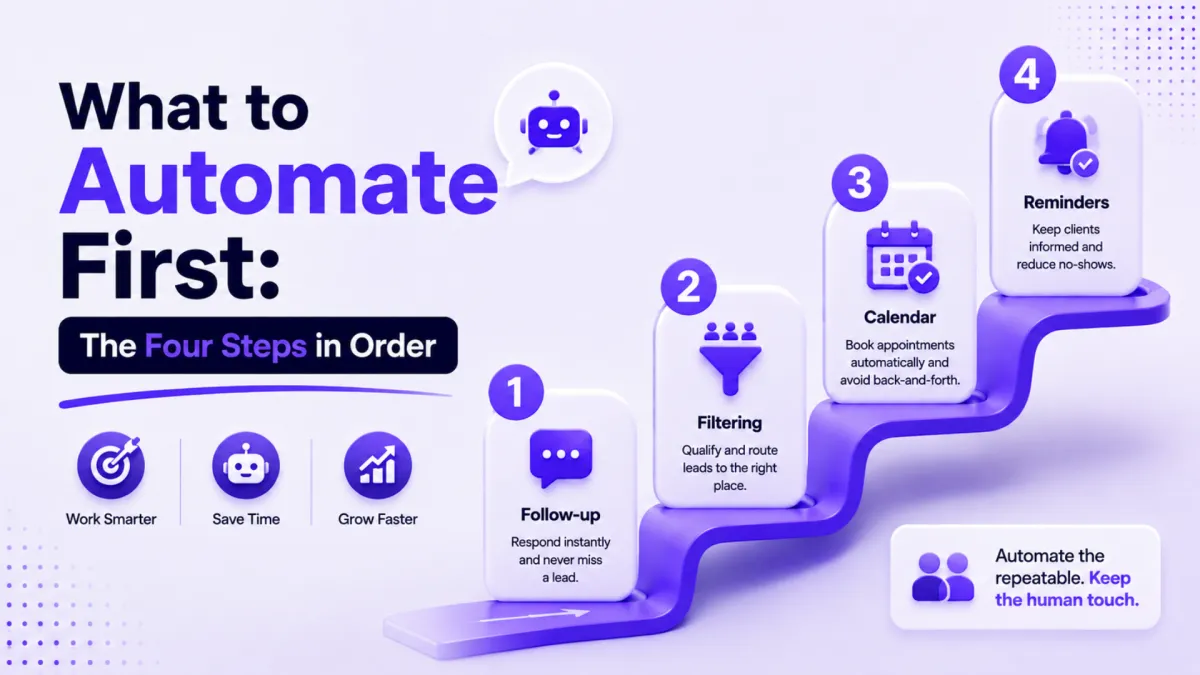
The best order to automate your business is: first, lead follow-up within the first hour. Second, a filtering page that qualifies leads before they can book. Third, an automated booking calendar. Fourth, appointment reminders. Follow-up comes first because roughly 42% of leads never receive any follow-up at all, and interest fades within about 48 hours. Automate the admin, and keep judgment, complaints, and relationship building human.
Why does the order matter more than the list?
When a business is built so that everything runs through the owner, everything runs through the owner. Every inquiry, every invoice, every "what time works for you?" message. That is not a motivation problem, and you can't fix it by wanting it more or waking up earlier. It's a design problem, and design problems have design fixes.
The trap is that most owners start with whatever looks most impressive. They build something clever, feel organized for about a week, and are still answering messages at nine on a Sunday night. The fun thing is usually a chatbot or a long email series. The expensive thing is sitting right at the start of the process, quietly leaking money. So the question isn't whether you should automate. It's what you automate first.
Step 1: Why is follow-up the first thing to automate?
Around 42% of leads never get a follow-up. Not a bad follow-up. No follow-up at all. And you have about 48 hours to reach someone after they show interest. After that you're not selling anymore, you're apologizing for being late.
We've never met a business owner who decided to ignore a lead. That's not what happens. What happens is the follow-up lives in your head, and your head is also holding client calls and school pickups, and it's Tuesday. Follow-up goes first because it's the only item on this list that costs you money the same day you skip it. The others cost you slowly. This one costs you today.
What good follow-up looks like is simple: a reply within minutes, not hours. A sequence that keeps gently going for a week or two, not one lonely email. And a way for the lead to take the next step without waiting for you. In PulseGrowth, an all-in-one CRM and automation platform for service businesses, this is a workflow that fires the moment someone fills in a form, messages your page, or calls and doesn't get through. Our AI communication tools can even answer the first questions for you.
Step 2: What does a filtering page actually do?
This is the step nobody talks about, and it's the one that gives back the most time. Here's the problem: when someone is interested, your instinct is to book a call. Then you sit on a call for 45 minutes with somebody who was never going to be your client.
The fix is one small page. Not a website. One page, with a short video where you explain what you offer and who it's for. Say who it's not for as well. That part matters more than people think. Then add a few qualifying questions before they can book: what are they working on, what have they tried, what's their budget if that's relevant to you.
Two things happen at once. The people who aren't a fit read the page and quietly leave, which saves both of you an hour. The people who are a fit arrive on your call already knowing what you do, and already halfway sold. You're not being unfriendly. You're being honest earlier.
Step 3: Why automate your booking calendar?
The gap between "I'm interested" and "I'm in your calendar" is where leads go cold. Every message asking what time suits them gives them a chance to get busy, change their mind, or book with someone faster. Interest doesn't last long, and every back-and-forth message uses some of it up.
The automated version is one link. It shows your availability in their time zone, they pick a slot, and the confirmation goes out on its own. And if you've built your filtering page properly, the only people reaching that link are people you actually want to talk to.
Step 4: Do appointment reminders really pay back that fast?
Reminders are the most boring thing in this post, and the thing that pays back fastest. A no-show isn't a lost lead. It's money you already earned and then dropped. You did the marketing, you checked they were a good fit, you got a yes, and then nobody came.
Businesses that chase confirmations by hand can lose around 11 hours a week to it. That's more than a full working day, every week, for something that takes one afternoon to set up. This one is good for almost any appointment-based business: coaches, consultants, med spas, clinics, salons, home services, anyone whose calendar is their income.
If you'd like the practical walkthroughs for all four steps, we made a free Plug and Play automation starter kit: 12 short video tutorials covering the follow-up, the filtering page, the calendar, the reminders, and more. No card needed. You can grab it here.
What should you never automate?
Almost everything is possible now. That's exactly why judgment matters. The rule we use: automate the admin, keep the judgment.
The call itself stays human. Anything with feelings in it stays human. Complaints stay human. And the moment when someone decides whether they trust you always stays human. We sell automation for a living, and we'll happily tell you that trust is not a workflow. Automate that part and you'll just get very good at losing people. If you're a coach or consultant, this matters double, because the relationship is the product. Automate everything around it. Don't automate it.
People often ask where reviews fit into this order. Reviews matter, but they come after you've sold and delivered something. They're the thing you switch on once the first four steps are working, not the place you start.
Key Takeaways
- Automate in this order: follow-up, filtering page, booking calendar, reminders.
- Set up automated follow-up that replies within minutes, because 42% of leads never hear back at all.
- Build one filtering page with a short video and qualifying questions so the wrong fits remove themselves.
- Replace "what time works for you?" with a single booking link that confirms automatically.
- Keep calls, complaints, and trust-building human, and switch on review requests only after the first four steps are running.
FAQs
What should a small business automate first?
Lead follow-up. It's the only automation that saves money the same day it goes live. Start with an instant reply to every new inquiry, then a short sequence that continues for a week or two.
How quickly should I follow up with a new lead?
Within the first hour if you can, and within minutes is better. Interest drops sharply after about 48 hours. An automated reply buys you time even when you're with a client.
What should you never automate in your business?
Sales calls, complaints, and anything involving feelings or trust. Automation should handle the admin around the relationship, not the relationship itself.
How long does it take to set up these automations?
Each of the four steps typically takes an afternoon or less with modern tools. Reminders are usually the quickest, and the follow-up sequence takes the most thought because you're writing the messages.
Where do reviews and referrals fit in?
After the first four steps are working. Reviews help the next buyer decide, so automate the request once you're reliably selling and delivering.
Want more like this?
PulseGrowth comes with the follow-up workflows, filtering pages, booking calendars, and reminders from this post built in, plus a 14 day free trial to test them on your own business. Start free, and we'll help you get it set up. Start your free 14 day trial here.
The PulseGrowth Team


